Industry
Cross-Border Trade
Client
Rakumart China
Year
2024
Duration
6 Months
Rakumart: A cross-border trade platform facilitating imports from China.

Rakumart is a digital platform that streamlines the import of products from China, offering end-to-end services from purchase to delivery. It operates through a smart digital tool that connects importers with trusted suppliers and manufacturers.
My role involved redesigning the platform’s interface and optimizing the user experience, with a particular focus on improving usability within the Dashboard.
I was the sole designer on the project, working closely with a team of four software engineers who later implemented the final design. My primary role was:
Digital Product Designer: I led the design of the entire platform, from initial research to final handoff — ensuring all solutions were functional, user-centric, and aligned with business goals.
I also took on several responsibilities related to project management:
Coordinated timelines and deliverables across each project phase.
Managed product scope, prioritized features, and ensured the design met key strategic requirements.
Collaborated closely with cross-functional teams including Sales, Customer Support, and Marketing, keeping all stakeholders aligned throughout the project.
Challenge
The original system had significant shortcomings that affected both users and the business. Fundamental principles of usability and user experience had not been considered, making it difficult for users to navigate and operate the tool effectively.
Many essential features were either broken or malfunctioning, leading to a constant reliance on the Support team. This not only overwhelmed internal workflows but also created high levels of frustration for both users and staff.
The user interface was outdated and unintuitive, with critical issues in data display and functionality. Additionally, the system lacked a solid foundation or design system to ensure consistency and scalability across the product.

Before I joined the team, Rakumart’s platform featured a cluttered and unintuitive design. The interface made navigation difficult and often led to user confusion, negatively impacting the overall user experience and significantly increasing the workload for the customer support team.
The project goals were clearly defined:
Elevate the user experience by ensuring smooth and intuitive interactions.
Enhance usability by making every navigation flow accessible and efficient.
Refine the user interface by improving its visual design and functionality for more effective interaction.
With these three objectives, our mission was to create a significantly better user experience while reducing the operational load on the customer support team.
I designed a strategic roadmap to guide the platform’s evolution over a two-year timeline, broken down into four key phases:
Intensive Care: A complete redesign of the platform, focused on maximizing available resources. (6 months – Current Phase)
Under Observation: A phase dedicated to iteration and research, while laying the foundations for building a design team. (6 months)
On Your Feet: Early steps toward a brand-aligned design system to enable scalability. (6 months)
Full Speed: The platform evolves into a robust digital ecosystem. (6 months)
This roadmap reflects clear scope management and prioritization of core functionalities, ensuring alignment with the business’s strategic requirements.
Product Design
Research
The research phase began with an in-depth analysis of the existing product. Field research played a key role in identifying major pain points and defining strategic priorities.
Product Audit: I started with a detailed review of the current platform, assessing every feature and user flow. This allowed me to pinpoint the most critical issues impacting the overall user experience.
User Interviews & Surveys: I conducted over 40 user interviews and distributed surveys to more than 8,000 registered users — achieving a response rate of over 10%

Key insights from registered user surveys during the research phase
Shadowing the Customer Support Team: To better understand user needs, I spent several weeks shadowing the customer support team. This hands-on experience gave me direct insight into the most frequent issues and recurring pain points users faced in their day-to-day interactions with the product.to.
User Research: Una parte eseA key part of the process involved gathering direct user feedback to drive design decisions. Based on the research findings and user segmentation within the platform, I developed three primary user archetypes. These personas became strategic tools for shaping the product design, helping to address a wider range of user needs.

Based on surveys, interviews, and user data from the platform, I designed these three archetypes to capture the most defining traits of each segment. The goal was to address a broad spectrum of user needs through tailored design solutions.
After completing user research, I defined several key objectives to measure the impact of the redesigned Dashboard:
Improve task success rate
Reduce time on task
Increase happiness rate
Decrease abandonment rate
These metrics will be critical to the platform’s future, as user feedback clearly indicated that they have the most influence on overall product perception — which, up to this point, has been largely negative.
Design Development
Given the tight timeline (two months until handoff), I decided to work with a UI kit (Untitled UI Kit) to streamline the process. This allowed me to save time while ensuring a solid and consistent design foundation, since there wasn’t enough bandwidth to build a design system from scratch.
The platform’s navigation was confusing and unintuitive, often leading users to get lost or make frequent errors. The solution was to simplify user flows and design an information architecture that was clean, functional, and aligned with user needs.
For the redesign, I broke down and simplified the existing structure as much as possible. Once the initial drafts were ready, I validated my assumptions through a card sorting exercise with office colleagues across all departments and roles. Their categorizations helped shape a navigation system that better matched user expectations and behavior.

The card sorting exercise was conducted in a shared FigJam file, allowing all team members to collaborate in real time. This activity not only helped structure the platform’s information architecture in a coherent way, but also served as an introduction to Figma for non-design teams like Marketing — encouraging adoption and promoting cross-functional use of the tool across the company.

Final information architecture model that guided the dashboard redesign
After completing the card sorting exercise, I was able to define the platform’s structure in a more evidence-based way.
The activity revealed how inexperienced users naturally interpreted product categories, leveraging their fresh perspective to achieve more accurate insights. This informed the creation of a new information architecture, which became the foundation for the dashboard redesign.
I then began working on wireframes to explore how to present key import data in a way that was clear, efficient, and easy to understand.

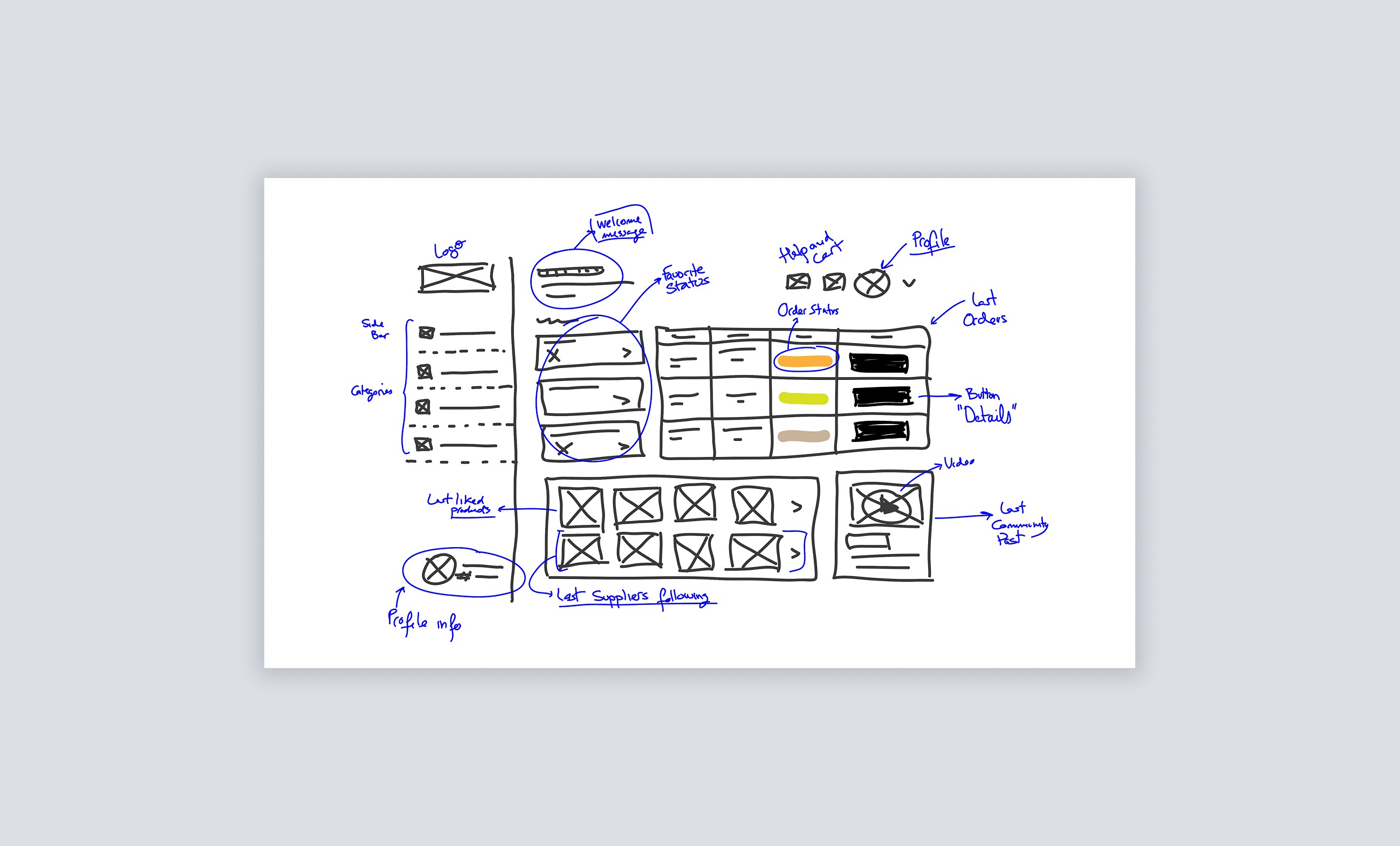
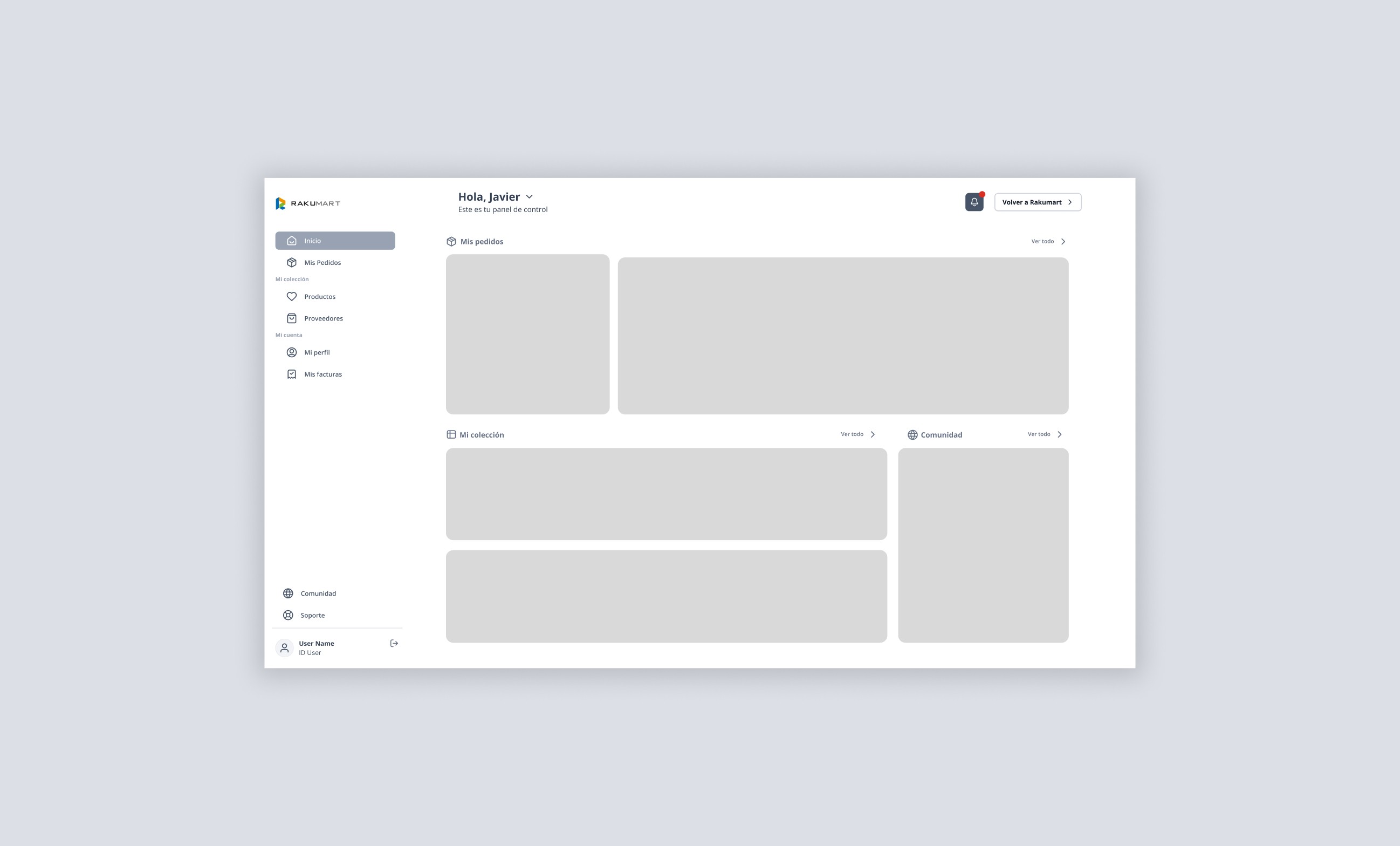

This sequence shows how the UI design process evolved — from the initial hand-drawn wireframes to the final product prototype. As a designer, the ability to express ideas through quick sketches is essential for communicating concepts clearly and efficiently from the very beginning.
One of the core components of the dashboard is the order view — the platform’s primary functionality and its main reason for existing.
Following the project’s key principle of keeping things simple and functional, I focused on improving the usability of the order view through the following actions:
Defined clear status indicators for each phase of the order process.
Implemented a simple yet effective filtering system using color-coded statuses.
Enabled custom identifiers for each order, allowing users to assign personalized names such as Shoes Q4 2025.
This video provides an overview of the orders section within the dashboard. It shows how the color-coded status labels also function as filters, enabling users to view each order state independently and streamline the search and filtering process.

Design of the "Delivered" order page, where all details related to both the order and the user are displayed.
Since orders are typically large and involve products from multiple suppliers, I added a preview feature to the main orders page. This allows users to quickly see the contents of each order at a glance.
The order editing feature was virtually non-existent, as it was previously managed entirely by the customer support team. With this new addition, the goal is to empower users to modify their orders independently, reducing their reliance on support.
I reduced friction in the payment process. Now, before proceeding to payment, users are taken to an order summary screen where they can adjust the shipping method and apply discount coupons offered by Rakumart as part of its loyalty strategy.
One of the most problematic areas of the dashboard — and a major pain point for the customer support team — was the incident management flow.
The previous process required support to act as an intermediary between both parties through separate communication channels, making issue resolution slow and inefficient.
From a product design perspective, I proposed enabling users to handle incidents independently. The new approach streamlines the process and guides users through each step of resolution via the interface — significantly reducing the workload on the customer support team.
We resolved one of the most critical friction points from the old dashboard by giving users greater control. This change had a positive impact on both usability and overall product perception.
A key aspect of the redesign was the introduction of new features within the dashboard.
This decision reflects our commitment to delivering more value to users — not just meeting expectations, but actively improving and scaling the product.
We introduced product collections and supplier collections, allowing users to create custom groupings based on their preferences and interests.

"My Collection" view on the Home page: Gives users a quick overview of their most recently added products and the latest followed suppliers.

From the homepage, users can quickly add their saved products and suppliers to custom collections or create new ones on the fly.
Creating collections is easy and takes no more than three steps. This feature allows users to save products and suppliers based on their own criteria.
The dashboard redesign introduced a new Community section, where registered users can access content related to imports, service updates, and support resources — helping them get the most out of the platform.
Additionally, user information management was streamlined. Previously, tasks such as updating shipping addresses or billing details heavily burdened the support team. Redesigning the user profile page was essential, and it was built on three core principles: simple, functional, and accessible.
Another key improvement was the redesign of the Help Center, which was restructured into six clear sections covering every phase a user goes through while interacting with the platform. The goal was to provide a logical narrative that guides new importers — or users unfamiliar with Rakumart — step by step through the entire process.

Main page of the Community section, where Rakumart will share content related to imports and helpful resources for users.

Help Center main page

User profile and information management
Brand Design
Once the product design phase was completed, I began working on the redesign of Rakumart’s brand, aligning its identity with the new product experience.
My goal with the rebrand was to ensure the logo reflected the product’s simplicity and intuitive nature. To achieve this, I chose an accessible sans-serif typeface. By keeping Rakumart’s original color palette, I preserved the brand’s recognizability, identity, and roots.


New Rakumart logo: I chose the Open Sans typeface because it’s highly versatile and offers excellent readability, making it an accessible and user-friendly choice.
One of Rakumart’s future goals was to expand the product into a mobile version, allowing users to easily manage and track their imports from their smartphones — covering the full range of devices.
To support this, I designed a preliminary mobile app layout, adapting key elements to ensure a consistent and functional user experience across platforms.

Rakumart app icon
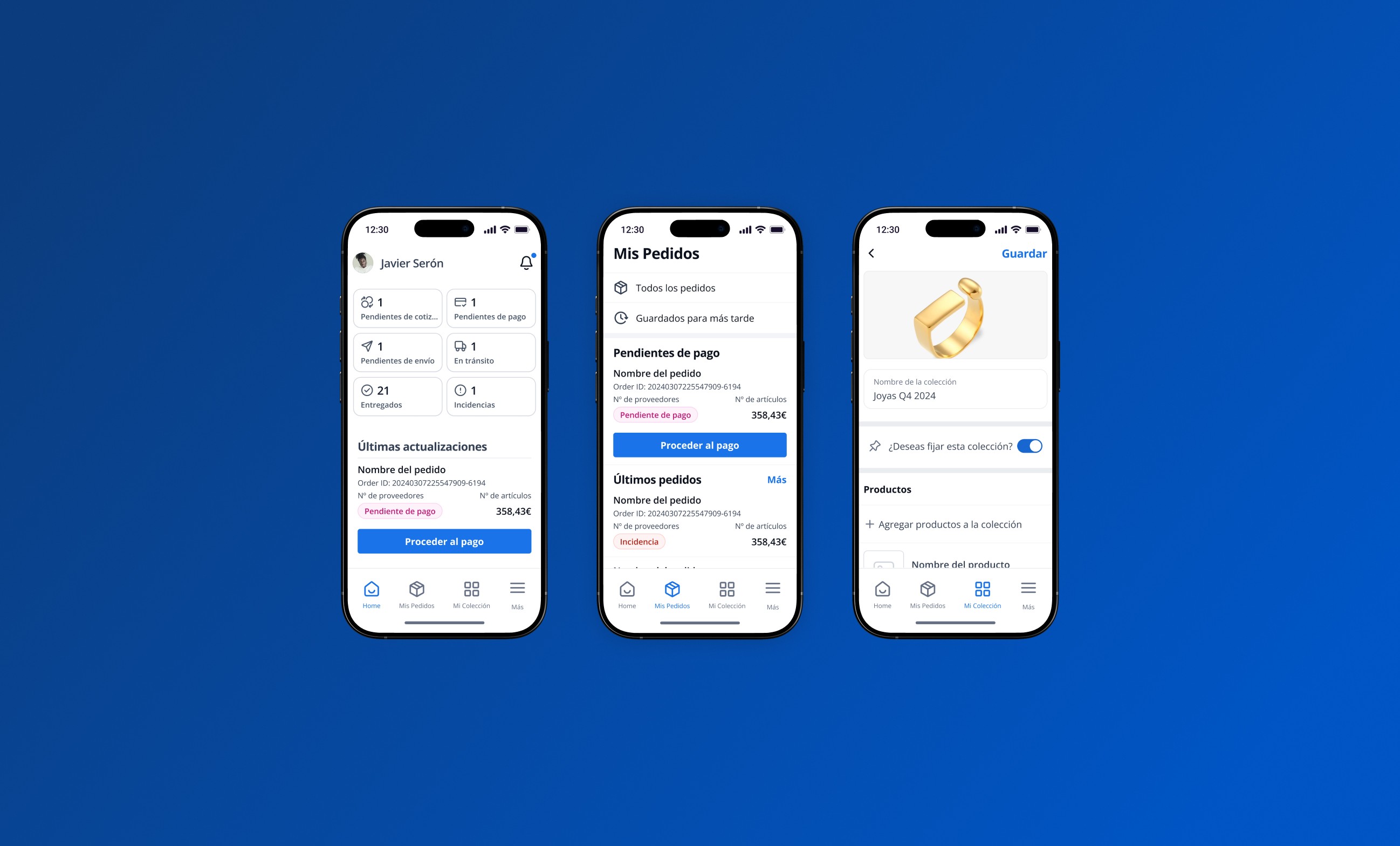
Some screens from the mobile version of the Dashboard
For the launch of the redesigned Dashboard, we needed a landing page to support the new experience — introducing the product and helping attract new users.
That’s why I designed a simple, focused landing page that clearly communicates the product’s features and benefits, while allowing users to sign up for free and join our community of importers.

Rakumart’s Landing Page
Outcome
To wrap up, I’d like to highlight some of the key takeaways from this experience:
Deep research is essential: Understanding users and their needs was critical to making informed, experience-driven design decisions.
The importance of iteration: Design is not a linear process — testing, gathering feedback, and continuously improving were all vital steps in reaching an effective solution.
Data- and need-driven decision-making: Every design choice was backed by insights from user research and testing. I learned to prioritize features, simplify flows, and justify my decisions with solid reasoning — always balancing user needs with business goals.
Clear communication and collaboration: Although I worked solo on this project, I learned to structure and communicate my design decisions clearly — a crucial skill for future collaboration with development and business teams.
Balancing usability with business impact: Good design should not only be intuitive and efficient for users but also aligned with the company’s strategic objectives.
This project marked the beginning of my journey as a digital product designer and reaffirmed my passion for creating solutions that improve user experiences and optimize complex processes.


